

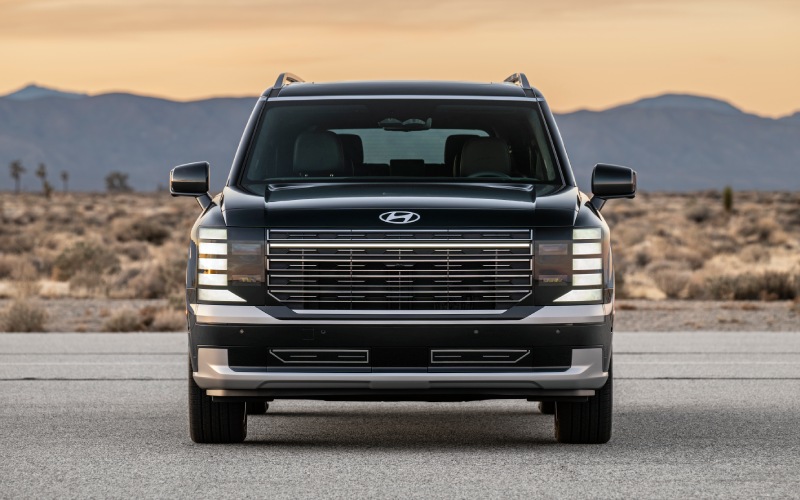
Stevens Point Auto Center – Does the 2026 Hyundai Palisade’s built-in Dash Cam record while parked near Appleton, WI?
If you often park at Fox River Mall, along College Avenue downtown, or in the lots around Lawrence University, you know that peace of mind in a busy area matters. The 2026 Hyundai Palisade includes a factory-installed, dual-camera Dash Cam that records while you drive and can also work with vehicle sensors to automatically capture nearby movement when the vehicle is parked. At Stevens Point Auto Center, we have walked many families from Appleton, WI through how this system works and how it can help document the unexpected when your SUV is out of sight.
Below, we break down what the Palisade Dash Cam actually does, how to view and save clips, real-world Appleton scenarios where it shines, and practical setup tips we share during delivery. We will keep everything focused on day-to-day ownership so you can decide with confidence whether this built-in feature fits your life.
What the factory Dash Cam does in the 2026 Palisade
Hyundai equipped the 2026 Palisade with a built-in, two-camera Dash Cam designed for everyday use. It can record continuously while you drive. When the Palisade is parked, the system can also use various vehicle sensors to automatically record nearby movement around your SUV. Video segments are easy to access right on the center display, and you can also offboard footage using the MicroSD card located in the glovebox.
Because this system is engineered into the vehicle, it is neatly integrated and powered through the Palisade’s own electronics, with clean camera placement and controls in the infotainment system. You do not have to run visible accessory wiring, and you get the convenience of managing clips in the head unit—something most aftermarket dash cams simply cannot match.
The result is a practical tool that can help capture useful context—whether you are merging onto US-41, pulling into an evening event near the Performing Arts Center, or returning to your vehicle after a youth sports pickup.
Why this matters around Appleton, WI
Appleton drivers balance city errands, school drop-offs, and highway trips to nearby parks and lakes. A built-in Dash Cam can provide valuable documentation and a little extra confidence in places you frequent, such as:
- Busy retail parking lots where tight spaces and frequent foot traffic make door dings and minor bumps more likely
- Downtown street parking where vehicles and pedestrians move close to parked cars
- School, park, and sports complex lots that fill quickly during events
- Hotel or airport lots when the Palisade is parked for extended periods
- Neighborhood overnight parking where capturing movement near the vehicle may be helpful
We always remind our Appleton guests that the Dash Cam is not a security system and cannot prevent incidents—but it can help record what happened. That documentation often proves useful for insurance, reporting, or simply understanding the sequence of events.
How to use it on day one
During your delivery appointment, our team will demonstrate the Dash Cam and help you practice the basics. If you like to get oriented before your visit, here is the high-level flow:
- Confirm that a compatible MicroSD card is seated in the glovebox slot so the system can save clips.
- Open the Dash Cam menu in the Palisade’s center display to view status, recent recordings, and management options.
- After a drive or after the vehicle has been parked, review clips on the display so you can immediately save or lock the ones you want to keep.
- When you are ready to offload, remove the MicroSD card and transfer clips to your computer or cloud storage.
Because the Dash Cam is integrated, you manage footage right on the touchscreen—no phone pairing or extra apps required to simply review and save recordings. And if you prefer to archive clips yourself, the MicroSD card workflow is straightforward.
When you take delivery from us, we also walk you through complementary tech you might want to set up the same day—Bluelink® connected services, Hyundai Digital Key 2.0 Premium, and wireless Apple CarPlay® and Android Auto™—so your Palisade feels fully tailored for your daily routine from the start.
Key differences versus aftermarket dash cams
Many owners compare built-in and add-on solutions before they decide. Here are notable advantages we show in the showroom:
- Factory integration for clean hardware placement and on-screen control
- Automatic coordination with vehicle sensors to help capture nearby movement when parked
- Glovebox MicroSD card location for simple, secure access to your footage
- No extra wires routed across the windshield or into accessory power sockets
- Seamless ownership experience alongside other Palisade technologies you already use
If you have a specific use case—say, documenting fleet drop-offs for your small business in Appleton or monitoring nearby movement in a shared garage—our product specialists can demonstrate how the Palisade’s system addresses that scenario.
And while your focus may be on the Dash Cam, remember that the 2026 Palisade brings a long list of confidence-boosting technologies to every drive, from Hyundai SmartSense driver assistance features to available HTRAC® All-Wheel Drive with terrain modes. It is a thoughtfully designed three-row SUV that layers convenience and safety to support your whole family.
Frequently Asked Questions:
Does the 2026 Hyundai Palisade’s Dash Cam record when the SUV is parked?
Yes. In addition to recording while you drive, the built-in, two-camera Dash Cam can work with various vehicle sensors to automatically record nearby movement while the vehicle is parked. Availability, behavior, and sensitivity may vary by conditions—see your Owner’s Manual for details.
How do I view or save my Dash Cam footage?
You can review video segments on the Palisade’s center display. To offload clips, remove the MicroSD card from the glovebox and transfer footage to your computer or preferred storage.
Do I need a subscription to Bluelink® for the Dash Cam to work?
No. The Dash Cam records to the in-vehicle system and the MicroSD card. Bluelink® offers other connected features and services, but Dash Cam video recording and retrieval do not require a data subscription.
Will the Dash Cam drain my battery when parked?
The Dash Cam is integrated with the Palisade’s vehicle systems and is designed to work with them. If you have questions about parked-recording behavior in your specific parking environment or usage pattern, our service team can walk you through best practices during delivery and your first service visit.
What MicroSD card should I use?
The Dash Cam records to a MicroSD card located in the glovebox. We will help you select a compatible, durable card at delivery so you have the right capacity and performance for your needs.
Can I get alerted on my phone if something happens?
The built-in Dash Cam can capture video segments you can later view in the vehicle or offboard via the MicroSD card. For smartphone alerts related to other vehicle conditions, you can explore Bluelink® features—our team will help you set up and personalize connected services that make sense for you.
Set up your Palisade with us—configured for life in Appleton
Our approach is simple: we make sure your 2026 Hyundai Palisade feels ready for your routine the day you drive home. If you park regularly near the Riverfront, around the campus, or in busy retail lots, we will show you exactly how to use the Dash Cam, how to review clips on-screen, and how to save important footage via the glovebox MicroSD card.
While we are getting you oriented, we can also tailor other tech you may want to use from day one—Digital Key 2.0 Premium for shared access in multi-driver households, Wi-Fi hotspot capability for passengers, and Over-the-Air updates that help keep the vehicle’s software current. If towing or winter traction is on your list, we will show you how Tow Mode and available HTRAC® All-Wheel Drive fit into the broader Palisade experience, too.
When you are ready, make the quick drive west to Stevens Point Hyundai and let our team give you a thorough walk-through. We serve shoppers from Appleton, Neenah, Menasha, and the surrounding communities, and we will gladly tailor your demo to your actual parking and driving patterns.
Features, specifications, and availability can vary by trim and production timing. Non-U.S. preproduction model with optional features is shown in some materials; the U.S. production model may vary. For complete details and limitations, consult the Owner’s Manual and talk with our product specialists.
Have questions you want answered before you visit? Call us or send a note—our non-commission product specialists will provide clear, helpful guidance. And when your Palisade arrives, we will get your Dash Cam, Bluelink®, Apple CarPlay®, and Android Auto™ set up so the SUV fits your Appleton routine right away.
Request more 2026 Hyundai Palisade information
Connect with us


- Ford
- Ford Bronco Sport
- Ford Dealer
- Ford Expedition
- Ford Explorer
- Ford F-150
- Ford Super Duty F-250
- Ford Super Duty F-350
- Hyundai
- Hyundai Dealer
- Hyundai Kona
- Hyundai Palisade
- Hyundai PALISADE Hybrid
- Hyundai Santa Cruz
- Hyundai Santa Fe
- Hyundai SANTA FE Hybrid
- Hyundai Sonata
- Hyundai Tucson
- Hyundai Tucson Hybrid
- Used Dealer
- Volkswagen
- Volkswagen Atlas
- Volkswagen Atlas Cross Sport
- Volkswagen Dealer
- Volkswagen Jetta
- Volkswagen Tiguan