
Will the 2026 Hyundai TUCSON’s Smart Cruise Control make Beltline traffic easier around Madison, WI?
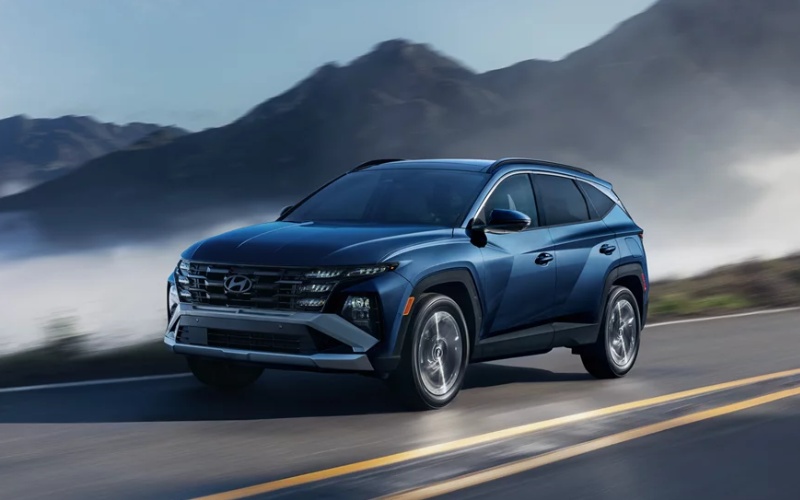
Stevens Point Auto Center – Will the 2026 Hyundai TUCSON’s Smart Cruise Control make Beltline traffic easier around Madison, WI?
Daily backups on the Beltline can add thirty minutes to an otherwise simple commute around Madison. If you have been wondering whether the 2026 Hyundai TUCSON can genuinely reduce that grind, our team at Stevens Point Auto Center has good news—its available driver-assistance tech, especially Smart Cruise Control and Smart Cruise Control 2, is purpose-built to take the edge off stop-and-go traffic and long highway stretches.
Below, we unpack exactly how the TUCSON’s cruise and lane-support features work on US-12/18 and I-39/90, which trims include which systems, and a few setup tips so you can get the most from the technology on your first test drive. We also connect the dots to other TUCSON features that make everyday driving—errands on East Washington Ave., school pickups in Monona, or weekend hops to Devil’s Lake—feel calmer and more consistent.
What Smart Cruise Control and Smart Cruise Control 2 actually do in Beltline traffic
Smart Cruise Control (SCC) with Stop & Go uses radar to maintain your selected speed and a set following distance to the vehicle ahead. When traffic compresses near Fish Hatchery Rd. or Todd Dr., SCC smoothly slows the TUCSON as needed, then accelerates again when your lane opens up. Crucially for Madison’s creeping congestion, SCC can bring the vehicle to a stop and, if the car in front starts moving within about 3 seconds, will resume automatically—reducing the constant footwork between brake and accelerator. If the stop lasts longer than a few seconds, a tap of the accelerator or the Resume button gets you rolling again.
Smart Cruise Control 2 (SCC2) builds on that by assisting with lane centering when conditions allow. If Forward Attention Warning detects that the driver is unresponsive, SCC2 may bring the vehicle to a stop and help keep it centered in the lane. That added support helps reduce the “pinball” sensation of following the subtle curves near Monona Bay and the West Beltline interchange.
Curve Control and Highway Driving Assist on Madison’s main corridors
Navigation-based Smart Cruise Control with Curve Control takes map data and observed speed limits into account. On sections of US-12/18 with changing speed zones or tighter bends, it can proactively adjust to a safer speed, then return to your set speed when clear. It’s the kind of subtle adjustment that helps you feel composed while merging by Midvale Blvd. or cruising the gentle arcs toward Verona Rd.
Highway Driving Assist helps maintain a set distance and speed and assists with lane centering on highways. Together with Lane Following Assist and Lane Keeping Assist, it helps the TUCSON track confidently within lane lines on I-39/90 and US-151, reducing micro-corrections that can fatigue your shoulders on longer stretches between Madison and Sun Prairie or down to Janesville.
Which 2026 TUCSON trims include these systems?
No guesswork required—here’s how the TUCSON lineup equips its cruise and highway-assist tech. If you are a Madison commuter weighing trims, this makes it easy to zero in on the configuration that fits your daily drive.
- Trims with SCC: SE and SEL include Smart Cruise Control (SCC) with Stop & Go.
- Trims with SCC2: SEL Premium and Limited include Smart Cruise Control 2 (SCC2) plus Navigation-based Smart Cruise Control with Curve Control.
- Highway Driving Assist: Standard on SEL Premium and Limited for added lane-centering help on highways.
All TUCSON trims also include Lane Keeping Assist and Lane Following Assist, so even if you choose a more streamlined model, you still benefit from steering support designed to keep you centered and reduce drift.
Real-world setup tips for Madison driving
Five minutes of presetting makes a noticeable difference your first time on the Beltline. Use the quick steps below as a checklist before pulling onto US-12/18 so the systems behave exactly the way you expect.
- Choose your following gap: Use the distance button on the steering wheel to set a following interval that matches your comfort level for Madison’s traffic flow.
- Confirm lane support: Make sure Lane Following Assist is on—its gentle centering reduces steering corrections through the Beltline’s gradual curves.
- Let SCC work to a stop: In slowdowns near the US-14 split, allow SCC to brake to zero; if your stop exceeds a few seconds, tap Resume or the accelerator when traffic moves.
- Use My Drive mode: In Drive Mode Select, tailor steering and throttle feel; some commuters prefer Normal with SCC for smoother throttle transitions.
- Keep sensors clear: After a slushy day or spring pollen burst, wipe the front radar area so detection stays crisp.
As with any driver-assistance system, you remain responsible for safe driving. Keep hands on the wheel and eyes on the road, and be prepared to take over at any time.
Where will you feel the difference first? Anywhere the rhythm of Madison traffic alternates between brisk and bunched—westbound around the Midvale interchange at rush hour, northbound I-39/90 toward DeForest, or across the Beltline bridges near John Nolen Dr. SCC helps smooth pace changes, while Curve Control and lane-centering support add calm precision.
TUCSON features that complement a steadier commute
Smart cruise tech is part of a larger, confidence-focused package. Forward Collision-Avoidance Assist is standard on all trims and can automatically apply braking to help avoid or reduce the severity of a potential collision. Blind-Spot Collision Warning provides helpful alerts for lane changes around crowded merge zones. High Beam Assist automatically toggles lights on darker county highways after Lake Monona events, so you are not fumbling with stalks while you steer.
Inside, the standard 12.3-inch touchscreen puts your route, podcasts, and messages within easy reach, with wireless Android Auto™ and Apple CarPlay® support to keep cords from tangling up your center console. Over-the-Air software update capability helps your TUCSON stay current. And if you choose Limited, available Remote Smart Parking Assist—standard on Limited—can guide the vehicle into or out of snug downtown ramps or apartment slots at the push of a Smart Key button.
If your weekends involve a quick paddle on Lake Mendota or a camping run past Sauk City, TUCSON’s versatile cargo area (up to 80.3 cu. ft. with seats folded, SAE 74.8 cu. ft.) and available HTRAC All Wheel Drive make it easy to load up and go. HTRAC All Wheel Drive intelligently distributes power between the axles for optimal traction on loose boat launches or gravel pull-offs by the trailhead.
Under the hood, the 187-hp 2.5L GDI/MPI 4-cylinder pairs with an 8-speed automatic with SHIFTRONIC®. The setup delivers composed acceleration for quick Beltline merges without constant downshifts. Idle Stop & Go helps curb unnecessary idling in longer backups, supporting efficiency without asking you to change your habits.
Hyundai backs TUCSON with America’s Best Warranty for lasting peace of mind, and Bluelink+ connected services let you lock, unlock, or remote start from your compatible smartphone—useful when your day ends across town and you want the cabin ready before you step outside.
Try the tech on your route—then decide
The best way to know if SCC, SCC2, and Highway Driving Assist fit your life is to feel them work on the exact types of roads you drive. We can set up a test loop that mimics your Beltline segment, a hop onto I-39/90, or a run across University Ave.—you choose the time and route, and we will help you explore the features step by step.
Madison-area shoppers are welcome at Stevens Point Auto Center—just up I-39. Our non-commission product specialists will walk you through trims and features without pressure, so you can focus on what solves your daily commute. We are happy to compare TUCSON SE and SEL for straightforward SCC, or step you into SEL Premium and Limited to experience SCC2, Curve Control, and Highway Driving Assist together.
Frequently Asked Questions:
Does Smart Cruise Control work on city streets like East Washington Ave.?
SCC can function anywhere it can detect a lane and a vehicle ahead, but it is engineered primarily for limited-access highways. On city corridors with frequent lights, cross traffic, and pedestrians, it is best used sparingly and with heightened attention. Always follow posted signs and be prepared to brake.
What is the difference between SCC and SCC2 on the 2026 TUCSON?
SCC maintains speed and following distance and can stop and go with traffic, resuming automatically if the vehicle ahead moves within about 3 seconds. SCC2 adds lane-centering assistance and may slow to a stop if the driver is unresponsive to Forward Attention Warning. SCC is standard on SE and SEL; SCC2 is included on SEL Premium and Limited.
Will Navigation-based Smart Cruise Control with Curve Control help on the Beltline’s curves?
Yes. Using map data and observed speed limits, it can proactively reduce speed for curves or speed-controlled zones—useful for the Beltline’s gentle arcs and posted changes—then return to your set speed after the curve or zone.
Can I still use Apple CarPlay® or Android Auto™ while cruise and lane assistance are active?
Absolutely. Wireless Android Auto™ and Apple CarPlay® support are standard. Your infotainment remains available while driver-assistance features operate in the background, though you should always keep your attention on the road.
Ready to see how the 2026 Hyundai TUCSON transforms your Madison commute? Tell us your daily route, and we will map a hands-on drive demonstrating Smart Cruise Control, SCC2, Highway Driving Assist, and more. Visit Stevens Point Auto Center or contact our team to schedule a test drive today.
Request more 2026 Hyundai Tucson information
Connect with us


- Ford
- Ford Bronco Sport
- Ford Dealer
- Ford Explorer
- Ford F-150
- Ford Super Duty F-250
- Ford Super Duty F-350
- Hyundai
- Hyundai Dealer
- Hyundai Kona
- Hyundai Palisade
- Hyundai Santa Cruz
- Hyundai Santa Fe
- Hyundai Sonata
- Hyundai Tucson
- Hyundai Tucson Hybrid
- Used Dealer
- Volkswagen
- Volkswagen Atlas
- Volkswagen Atlas Cross Sport
- Volkswagen Jetta
- Volkswagen Tiguan