

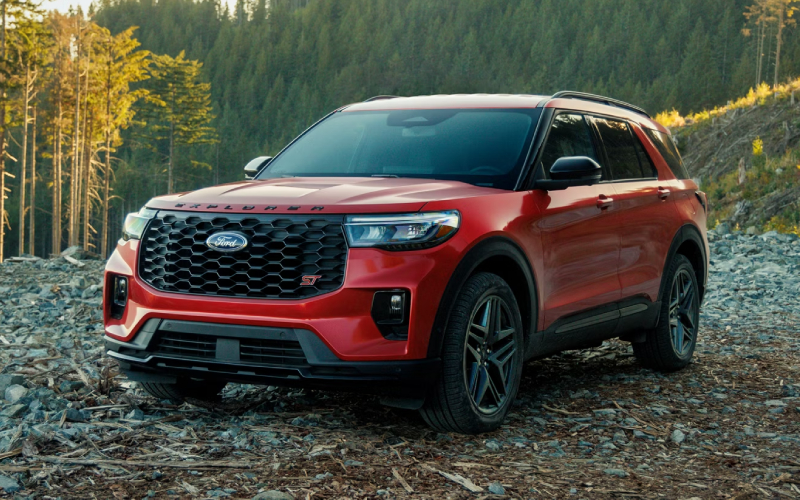
Stevens Point Auto Center – 2026 Ford Explorer: How Ford Digital Experience and BlueCruise enhance daily driving around Rothschild, WI
When an SUV integrates useful tech without adding complexity, every drive feels calmer and more productive. That’s the idea behind the Ford Digital Experience and available BlueCruise on the latest Explorer, a combination that unifies navigation, voice assistance, streaming capabilities, and highway hands-free driving. If your weekly routine includes school drop-offs, I-39 traffic, and weekend detours for sports or trailheads, these features can streamline your time behind the wheel while keeping eyes-up awareness at the center of the experience.
The Ford Digital Experience is anchored by a standard 13.2-inch LCD touchscreen and a clean interface that surfaces what you need most. Apple CarPlay® and Android Auto™ integrate quickly for music, messaging, and maps, while Google and Amazon apps add familiar services and voice-driven convenience. When parked, YouTube streaming and browsing via Google Play turn the cabin into a quiet space to catch up—ideal during practice pickup windows or while waiting curbside. Pair that with available BlueCruise hands-free driving on compatible highways, and longer trips feel more manageable, with the system helping maintain speed, distance, and lane position while you stay attentive to the road.
- Ford Digital Experience: Brings Google and Amazon app access, a streamlined interface, and in-park streaming from YouTube for downtime at fields or trailheads.
- Simple device power: Eight USB ports, including third-row access, plus three 12-volt outlets help keep everyone’s devices charged without rotating cables.
- B&O Sound System by Bang & Olufsen: Available 12-speaker audio enriches podcasts, playlists, and calls with a detailed soundstage for every row.
- BlueCruise availability: Hands-free highway capability on compatible roads helps reduce fatigue during longer stretches while preserving driver awareness.
These features shine because they’re built on a strong foundation. The Explorer’s rear-wheel-drive architecture gives it balanced manners, and the standard Class III Towing package and trailer sway control make family gear, utility trailers, and boats part of the plan rather than the exception. That harmony—mechanical confidence with intelligent tech—means your day runs on your schedule, not the other way around.
- Set up profiles: Customize driver settings so navigation, audio, and driver-assist preferences load automatically for each driver.
- Connect your apps: Link Apple CarPlay® or Android Auto™ and sign in to supported Google and Amazon services for a familiar, personal interface.
- Learn the cues: Review BlueCruise prompts and visual indicators so you know when hands-free driving is available on compatible highways.
- Use downtime: When parked, use YouTube streaming to keep kids entertained or to catch a quick tutorial before unloading at the trail.
For families and commuters, the value of this tech isn’t just novelty—it’s the way it reduces switching costs throughout the day. Fewer steps to launch what you need, consistent voice control across services, and a clear, responsive screen help you stay focused. And when road trips stretch across counties, available BlueCruise lends a helpful assist on compatible highways so you finish the drive more refreshed.
At Stevens Point Auto Center, our product specialists can show you how to personalize the Ford Digital Experience, connect your accounts, and demonstrate BlueCruise’s live cues so you know exactly how it behaves on the routes you drive most. It’s a smart way to ensure you’re using the Explorer’s technology to its full potential from day one, with tips that match your family’s patterns and priorities—serving Waupaca, Rothschild, and Appleton.
Frequently Asked Questions:
Does BlueCruise work in bad weather?
BlueCruise depends on clear lane markings and sensor visibility. In heavy snow, fog, or hard rain, it may prompt you to resume manual steering until conditions improve.
Can passengers watch YouTube while driving?
Streaming is available while parked. During driving, driver-focused functions remain prioritized to support safety and keep attention on the road.
How quickly does Apple CarPlay® or Android Auto™ connect?
Once paired, connections typically occur within moments of startup, so your apps are ready by the time you select a destination or cue your playlist.
Request more 2026 Ford Explorer information
Connect with us


- Ford
- Ford Bronco Sport
- Ford Dealer
- Ford Expedition
- Ford Explorer
- Ford F-150
- Ford Super Duty F-250
- Ford Super Duty F-350
- Hyundai
- Hyundai Dealer
- Hyundai Kona
- Hyundai Palisade
- Hyundai PALISADE Hybrid
- Hyundai Santa Cruz
- Hyundai Santa Fe
- Hyundai SANTA FE Hybrid
- Hyundai Sonata
- Hyundai Tucson
- Hyundai Tucson Hybrid
- Used Dealer
- Volkswagen
- Volkswagen Atlas
- Volkswagen Atlas Cross Sport
- Volkswagen Dealer
- Volkswagen Jetta
- Volkswagen Tiguan